
How to Search for Cars on YallaMotor: Step-by-Step Guide for UAE Buyers
Tags:
How can you find new or used cars on YallaMotor?
YallaMotor offers one of the most powerful car search experiences in the Middle East. Whether you're looking to buy a used car in Dubai or browse new cars in the UAE, this guide walks you through each step of the process using our filters, AI Smart Search, and mobile app.
The platform supports buyers across multiple countries including the UAE, Saudi Arabia, Egypt, and other GCC markets. From intelligent filtering to instant WhatsApp contact, finding your next car has never been easier.
- Supports desktop and mobile platforms
- AI-based search for natural queries
- Verified listings with detailed car specs
Step 1: Select Your Country Website
Start by visiting the correct localized version of YallaMotor. Each country site displays pricing, models, and listings specific to that market.
- UAE: uae.yallamotor.com
- Saudi Arabia: ksa.yallamotor.com
- Egypt: egypt.yallamotor.com
- Qatar:qatar.yallamotor.com
- Kuwait:kuwait.yallamotor.com
- Oman:oman.yallamotor.com
- Bahrain:bahrain.yallamotor.com
If you're located in Bahrain, Qatar, Kuwait, or Oman, the platform will automatically serve listings based on your IP or manual selection.
Step 2: Choose Between New or Used Cars
Once you're on the homepage, select whether you want to browse new cars or used cars. Here's what each section offers:
New Cars Section
Explore brand-new models directly from authorized dealers, complete with specs, pricing, and trim availability. Perfect for those looking for the latest features, warranty, and zero mileage.
Used Cars Section
View thousands of verified used cars like the Toyota Camry with photos, condition details, and direct seller contact. Listings are filtered by year, mileage, and more.
Step 3: Use Filters to Narrow Your Search
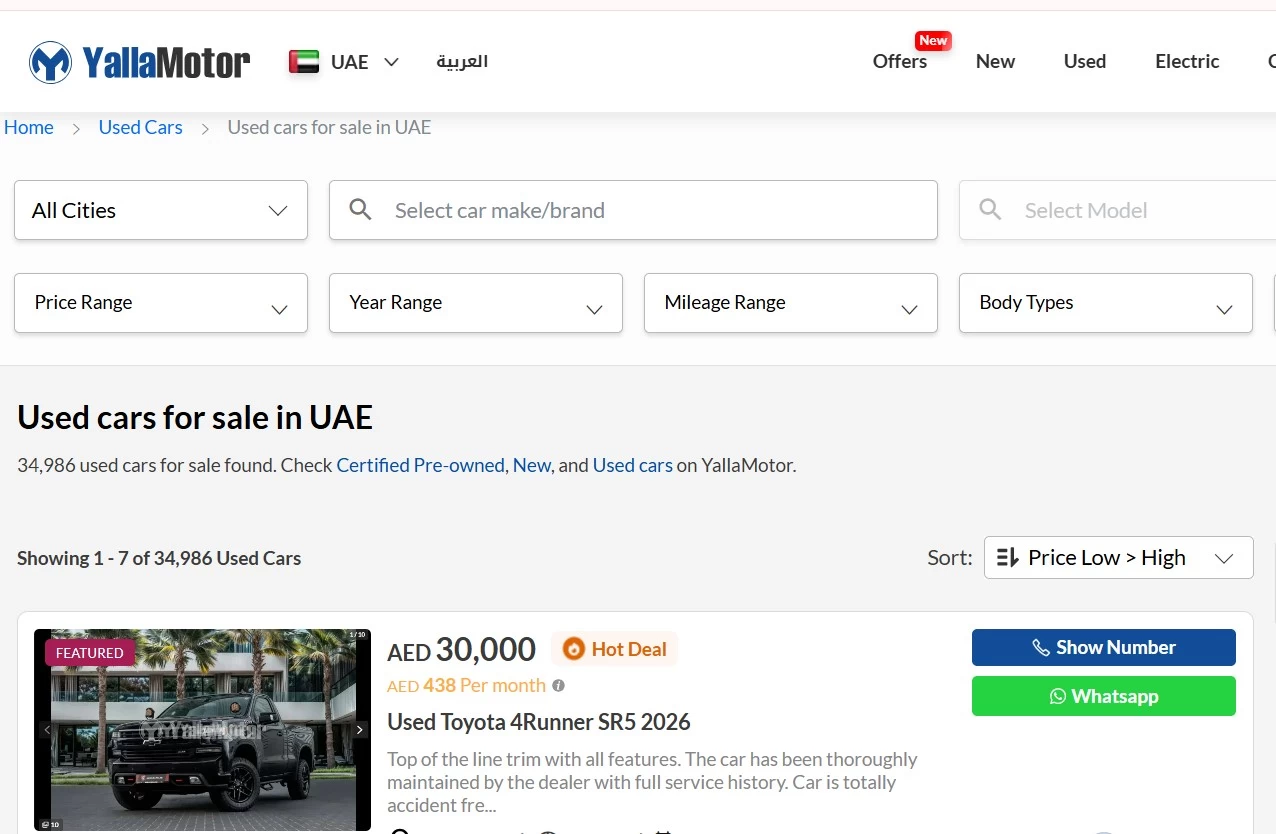
Once inside the car listing page, use the left-hand panel to apply filters that match your preferences:
- Make & Model – e.g., Nissan Patrol, Hyundai Tucson
- Price Range – Set min and max budget
- Year of Manufacture – Choose model years
- Mileage – Especially important for used cars
- Body Type – SUV, Sedan, Coupe, etc.
- Transmission – Automatic or Manual
- Fuel Type – Petrol, Diesel, Electric, Hybrid
This helps you instantly eliminate irrelevant results and focus on cars that truly fit your lifestyle and budget.
Step 4: Try the AI-Powered Smart Search Tool
YallaMotor’s AI Smart Search tool lets you find cars using natural language queries. This is especially useful if you’re not sure which model or brand you want.
Just type something like:
"SUV under AED 80,000 with panoramic sunroof and low mileage"
The platform will immediately return matches based on your criteria using real-time filters behind the scenes.
This feature is available on both the website and the mobile app. It’s a game-changer for first-time buyers.
Step 5: Use the YallaMotor Mobile App

For a smoother and faster experience, download the YallaMotor app on iOS or Android. It offers all desktop features plus:
- Save favorite cars to your profile
- Receive price drop alerts instantly
- Chat directly with sellers via WhatsApp
- Access Smart Search with voice or text
The app is optimized for daily browsing and quick access while on the move. It’s especially helpful when inspecting a car in person.
Step 6: View Full Listing Details
Click on any car listing to see all the information you need to make a decision:
- Photo gallery: interior, exterior, engine
- Detailed specifications and feature list
- Condition: accident history, mileage, ownership
- Pricing, location, and seller info
- Contact buttons for direct call or WhatsApp chat
All listings are verified manually to ensure transparency and user trust.
Step 7: Request Extra Services
Before making a final decision, YallaMotor allows you to access additional services that ensure a safe and smart car purchase:
Vehicle History Report
Get a full report on accident history, service records, mileage accuracy, and ownership changes.
Car Valuation Tool
Find out how much your car is worth before trading it in. The tool uses current market data from across the UAE.
360° Car Inspection
Book a professional inspection and receive a detailed report with expert feedback. Ideal for peace of mind before buying.
Car Insurance (Shory)
Compare insurance plans and buy coverage online in just a few minutes with YallaMotor's partner platform, Shory.
Still Have Questions?
If you're unsure about any part of the process, head to the YallaMotor blog for car buying tips, maintenance advice, and comparisons between top models like the MG ZS and Chery Tiggo 7 Pro.
Final Thoughts: Why Use YallaMotor to Find Your Next Car?
From filtering tools and AI features to verified listings and mobile support, YallaMotor is designed to make car shopping easy, fast, and smart. Whether you’re buying your first car or upgrading to something better, you’ll find exactly what you need with confidence.
Looking for a used car for sale in Dubai or new car for sale in Dubai?
