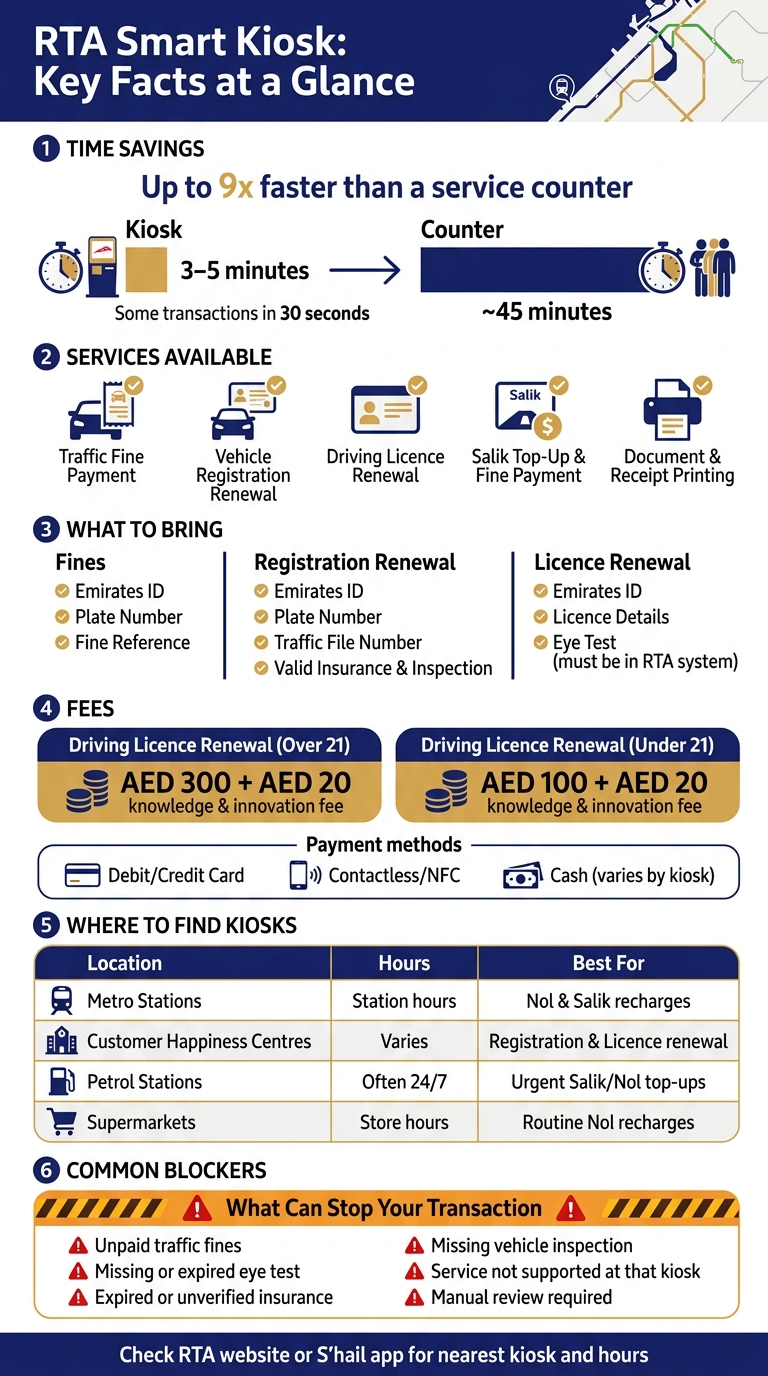
If I want to sort an RTA task fast, a smart kiosk is often the simplest option. I can pay fines, renew a driving licence, renew vehicle registration, and handle some Salik services in one place, often in minutes, and some kiosk transactions can finish in about 30 seconds.
Before I go, I check three things: my documents, my pending fines, and my payment method. That matters because most failed kiosk visits happen when an eye test, insurance, inspection, or unpaid fine is still blocking the request.
Here’s the full picture in plain terms:
What kiosks do: fine payment, licence renewal, registration renewal, Salik top-up, and receipt or card printing
What I need to bring: Emirates ID, plate number, traffic file details, licence details, and a bank card
What can stop a transaction: unpaid fines, missing eye test, expired insurance, missing vehicle test, or a service not supported at that machine
Where to find one: Metro stations, petrol stations, Customer Happiness Centres, and some supermarkets
When to use one: when I want to avoid queues and finish a routine RTA task on the spot
A few numbers stand out. Vehicle registration renewal at a kiosk can take about 3 to 5 minutes, compared with around 45 minutes at a counter. Driving licence renewal fees are usually AED 300 for drivers over 21, or AED 100 for those under 21, plus AED 20 in knowledge and innovation fees.
Task | What I usually need | What may block it |
|---|---|---|
Pay fines | Emirates ID, plate number or fine reference | disputed fine or manual review case |
Renew registration | Emirates ID, plate number, traffic file, valid insurance and inspection | unpaid fines, failed or missing inspection, insurance not showing |
Renew licence | Emirates ID, licence details, eye test in system | unpaid fines or missing eye test |
Salik top-up or fine payment | Salik account or tag number, payment card | kiosk not supporting that service |
Bottom line: RTA smart kiosks are best for routine, self-service transactions. If my records are already updated in the RTA system, the process is usually short, cashless, and direct.
RTA Smart Kiosk vs Counter: Time, Cost & Services at a Glance
What RTA Smart Kiosks Are and What Services They Offer
RTA Smart Kiosks are self-service machines connected to RTA systems. They let you finish selected driver and vehicle transactions on the spot. In busy locations, many of these kiosks run 24/7, which makes them handy when you need to sort out a transport task fast.
The main draw is simple: speed. Instead of moving between counters, you can handle several routine RTA tasks on one machine.
Core Services Available at the Kiosk
Most drivers use these kiosks for a small set of common services.
Traffic fine inquiry and payment lets you check and pay any traffic, parking, or Salik fines linked to your traffic file or plate number.
Vehicle registration renewal can also be done at the kiosk, as long as your insurance and vehicle inspection are already valid in the RTA system. The machine checks your file, takes payment, and prints the renewed registration card. This usually takes 3 to 5 minutes, compared with about 45 minutes at a service counter.
Driving licence renewal works in much the same way. Once your eye test is done and any pending fines are cleared, the kiosk pulls up your licence record, processes the renewal, and prints the new licence card. The standard renewal fee is AED 300 for drivers over 21 and AED 100 for those under 21, plus an AED 20 knowledge and innovation fee.
Salik-related services are also available at many kiosks. You can top up your Salik account or pay Salik fines without going to a separate office. Just enter your Salik account or tag number, pick the top-up amount, pay, and the balance updates shortly after.
Some kiosks also print official documents and receipts right away. That helps if you need your registration card immediately or want a paper receipt for your records.
Services That May Vary by Kiosk Location
Not every kiosk does the same job. Kiosks inside major RTA Customer Happiness Centres usually support more transactions, while machines in smaller vehicle testing centres or outside venues may offer fewer services.
RTA also sets up machines based on local demand. On top of that, cashless-only kiosks may support a different set of services than older machines.
It’s worth checking the on-screen menu before you begin. Start only the service that your kiosk actually supports.
Before using one, make sure you have the right details and a payment method ready.
What to Prepare Before Using an RTA Smart Kiosk
Bring the right ID, file numbers, and a working payment method so you can finish the job in one visit. RTA smart kiosks only work smoothly when your records, papers, and payment details are already in place. What you need will change a bit based on the service.
Required IDs and Vehicle Details
It helps to sort your items by the task you're doing.
For fines: bring your Emirates ID, plate number, and fine reference number.
For registration renewal: bring your Emirates ID, plate number, traffic file number, and your Mulkiya where needed. Any required vehicle inspection should already be done and still valid in the RTA system before you arrive.
For licence renewal: bring your Emirates ID and driving licence details. Check that your eye test has already been completed, because approved centres send the result straight to the RTA system.
Payment Methods, Fees, and Service Conditions
Fees are charged in AED. Card payment is the option you can count on most often. Some kiosks also take debit cards, cash, or contactless card or phone payments. Since payment options differ from one kiosk to another, it's smart to carry a backup card.
The usual issues are outstanding fines, expired supporting documents, or choosing a service that can't be finished at that kiosk. For example, a licence renewal may fail if the eye test isn't in the system yet or if there are unpaid fines. Some company or multi-file transactions may also need to be done at a Customer Happiness Centre or inspection centre instead of a self-service kiosk.
Check your records before you leave. A two-minute check can save you a second trip. With those details sorted, the next section walks through the kiosk process step by step.
How to Use RTA Smart Kiosk: Step-by-Step
Using an RTA Smart Kiosk is fast and simple. The steps below cover most kiosk transactions.
The Basic Kiosk Flow from Start to Payment
Start by waking the screen and choosing your language. Then select the service you need.
Next, confirm your identity by scanning your Emirates ID or entering your ID number by hand. For some services, the kiosk can pull your details from UAE Pass or your RTA profile. That means less typing and fewer mistakes.
After that, the screen shows the main details tied to your request. This can include fines, expiry dates, licence status, vehicle details, and the total fees in AED. Take a moment to check your name, ID, plate number, and fees before you confirm. If something looks off, use Edit, Back, or Cancel before paying. Once everything is correct, pay by card or NFC, then collect any receipt or document the kiosk prints. The session ends on its own after a period of inactivity.
The aim is simple: finish the whole transaction in one visit.
Two of the most common kiosk tasks are paying a fine and renewing registration. If you have your documents and payment method ready, here's how each one usually goes.
Example Tasks: Paying a Fine and Renewing Registration
Paying a traffic fine is usually a short process. After you identify yourself, choose the traffic fines payment option. The kiosk then shows any unpaid fines, including the date, offence type, and amount for each one. Select the fine, or fines, you want to pay and confirm the payment. After that, you receive an SMS and a receipt. If a fine is under dispute or must be handled through a Customer Happiness Centre, the kiosk stops the transaction.
Renewing vehicle registration has a few extra checks. Choose Vehicle Services, then Renew Vehicle Registration. Enter the vehicle details the screen asks for, and the kiosk pulls up your record. It then checks your insurance, inspection status, and any unpaid fines. If all requirements are met, the renewal fee appears before payment. Once you pay, the kiosk issues the renewed card or a temporary confirmation, depending on the machine. If something is missing, the process stops and the kiosk tells you what needs to be fixed first.
Next, check where to find a kiosk, which ones run the longest hours, and what each location can handle.
Where to Find RTA Smart Kiosks, Key Benefits, and Limitations
Kiosk Locations and Access Hours
Once you know how the kiosk works, the next step is simple: find the nearest one that handles what you need.
RTA Smart Kiosks are available at Dubai Metro stations, major bus stations, RTA Customer Happiness Centres, selected petrol stations, and some supermarkets. Selected supermarkets also host RTA kiosks.
Access hours depend on the location. Kiosks at Metro stations follow the station’s opening hours, while kiosks at Customer Happiness Centres run during each centre’s working hours. If you need a kiosk late at night or early in the morning, petrol station kiosks are often the easiest option, since many run 24/7. Before heading out, it’s worth checking the RTA website or the S'hail app for the nearest kiosk and its current hours.
Location Type | Typical Access Hours | Best For |
|---|---|---|
Metro Stations | Station opening hours | Nol and Salik recharges |
Customer Happiness Centres | Varies by centre | Vehicle registration, licence renewal |
Petrol Stations | Often 24/7 | Urgent Salik/Nol top-ups, purchasing Salik tags |
Supermarkets | Store opening hours | Routine Nol card recharges |
Benefits and Limitations to Keep in Mind
Smart kiosks can save a lot of time on routine jobs. They help cut queue time for tasks like Salik top-ups, Nol recharges, fine payments, and document printing.
That said, convenience doesn’t mean every request will go through automatically. Service rules still matter.
There are a few limits to watch for:
Fees paid at a kiosk are generally non-refundable once processed.
New Salik accounts can take up to 2 working days to activate. Any tolls during that period are charged later once the account becomes active.
A kiosk can process vehicle registration payment, but the vehicle must still pass a physical inspection at an authorised testing centre before registration is complete.
If the kiosk can’t verify insurance, inspection, or eye-test data, the transaction stops there.
Any service that needs manual review must be completed at a Customer Happiness Centre.
In short, kiosks are great for fast, everyday tasks. But when a service depends on checks, approvals, or in-person inspection, you may still need to visit a service centre.
FAQs
Can someone else use the kiosk for me?
Yes, someone else can use an RTA Smart Kiosk for you.
These self-service machines are made for public use, so another person can handle payments or renewals on your behalf by following the on-screen steps.
They’ll need the right details or documents to finish the service, such as:
Vehicle details
Account numbers
A valid payment method
That’s the main thing: if they have the correct information, they can usually complete the process for you.
What should I do if the kiosk cannot find my records?
If an RTA Smart Kiosk can’t find your records, head to an RTA Customer Happiness Centre for help.
You can also contact the RTA directly, or check your status through its official website or mobile app. Those channels may give you more complete account tools and extra support when you need to sort out record issues.
Do kiosk renewals update instantly in the RTA system?
The available information does not clearly confirm whether renewals done at RTA smart kiosks show up in the RTA system right away.
What it does say is simpler than that: the kiosks offer renewal services. But it does not state the exact system update time or sync delay.
So if you're looking for a direct answer, it's not confirmed based on the information available.